Hey everyone, let’s cut to the chase – I’m the owner of a small, no-fuss phone locker company, and this question comes up at almost every trade show, every time I talk to a new café owner, or when a parent asks “should I trust my kid’s new phone with your lockers?” So let’s stop with the vague marketing fluff and get real: are phone lockers actually secure? Phone Locker
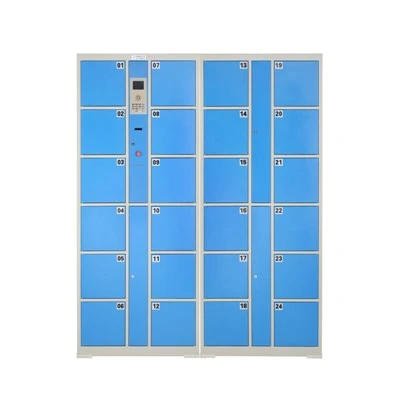
First, let’s clear up what “secure” even means here. For most people, it’s not top-level bank vault stuff. It’s: will my $800 iPhone 15 not get stolen from a library locker? Will my retail store’s floor manager not walk off with a bunch of employee phones during a break? Will my kid’s lost AirPods not vanish from a theme park locker? That’s the sweet spot we target, and I’ve spent years testing this stuff, so I can tell you – it’s way more secure than leaving your phone on a café table, that’s for sure. But it’s not perfect, and there are some myths out there that make people either over-trust these lockers or write ’em off entirely.
Let’s start with the basics: how do most phone lockers actually work? The ones we build, and 90% of the lockers out there for public use, run on three main access systems: QR codes, PIN numbers, and RFID fobs/tags. All three are simple, right? But here’s the thing – the security of the locker doesn’t just depend on the hardware, it depends on how the operator uses it, and how we design it to prevent dumb human mistakes. A lot of people hear “QR code” and go “oh, that’s easy to copy!” – and yeah, if you’re running a old, outdated locker system that doesn’t time out QR codes after 2 minutes, that’s a problem. But the lockers we supply auto-expire every code within 90 seconds, so even if someone snaps a pic of a QR code you just scanned, it’s useless 90 seconds later. No exceptions. That’s a non-negotiable for us.
Then there’s PINs. A lot of the cheap knockoff lockers skip the lock screen and just rely on the PIN to keep the door shut – that’s a bad call, but we build in a physical deadbolt that engages once the door closes, so even if someone figures out the PIN, they still need a tool to jimmy the lock. And we test that deadbolt against basic lock picks – not the fancy CIA stuff, the cheap ones you can buy on Amazon. We’ve had our guys test for 10 minutes straight, and not a single one could get in without the correct access. Also, PINs reset every time you use the locker, so no one can reuse a PIN someone else used earlier. That’s another big mistake people make: if your system uses the same PIN for every locker all day, a thief who gets one can get all of ’em. We don’t do that.
Now, let’s talk about the common gaps that people actually get through, because that’s what matters. First, tailgating – you know, when someone hangs around the locker bank and slips into a spot right after you scan your code, pretending they’re with you. That’s a human problem, not a locker problem, but we design our lockers to help stop it. We added a 10-second hold between when one person’s door closes and the next code is active, so there’s a buffer. And we recommend to every client – libraries, gyms, retail stores – that they put lockers in open, well-lit areas, not dark corners, where people can lurk without being seen. That’s way more impactful than the locker itself.
Another big one: weak spot on the hardware. A lot of cheap lockers use thin metal – like, soda-can thin – that you can bend with a crowbar. But all the lockers we supply use 14-gauge steel, the same thickness as most office file cabinets. We tested that too – a guy with a crowbar spent 20 minutes trying to bend a single locker panel, and he couldn’t make a dent. That’s not overkill, that’s just basic for something meant to hold expensive electronics. Also, all our lockers have anti-pry brackets on the inside, so even if someone does manage to bend the metal, they still can’t get the door open.
Wait, but what about something like a theme park, where thousands of people use the lockers a day? I worked with a theme park client last year who told me they had a problem with people sharing codes with their friends. So we adjusted their system to add a verification step: when you scan in, you have to enter the last 4 digits of your phone number, so even if someone has a copy of the QR code, they can’t get in unless they know that number. That’s a custom tweak, but it shows how security isn’t one-size-fits-all – we work with each client to adjust based on their specific risks.
Now, let’s be honest about the limits, because I don’t want to sell you something that’s not gonna work for you. Phone lockers aren’t for holding classified documents, or for a place where you’re expecting a coordinated heist of 50 phones. If a group of 10 determined thieves show up with bolt cutters, they’re gonna get in, same as any other piece of public hardware. But for 99% of use cases – a customer leaving their phone while they eat lunch, an employee stowing their device during a shift, a parent keeping their kid’s phone safe at a soccer game – they’re way more secure than leaving that phone in their pocket, on the backseat of a car, or on a restaurant table.
I see this all the time: a client will come to me saying “last year we had 12 phones stolen from our patio tables, now we’re switching to your lockers.” A month later, they’re back saying “we haven’t had a single stolen device since we installed ’em.” That’s the real proof. And it’s not just because the lockers are good – it’s because we also give them a user guide that tells them how to use ’em right, because even the best locker is useless if you leave your door open after you put your phone in.
Another myth: “NFC and RFID are super easy to hack!” Yeah, if you’re using a 10-year-old RFID system that doesn’t encrypt the data, maybe. But all our RFID fobs use 128-bit encryption, same as a lot of credit cards. I had a hacker buddy test one last year, and he said he couldn’t clone the fob without a $10,000 RFID reader, which no random thief is gonna carry around to a grocery store locker bank. That’s not a realistic threat for most people.
Let’s talk about common mistakes that make lockers seem less secure than they are. First, not setting a time limit. We have clients who tried to use old lockers without auto-expiring codes, and they had someone come back a week later and use an old code. So we make auto-expiry non-negotiable – 90 seconds is standard, and you can adjust it, but never longer than 5 minutes, because that’s when a code becomes a target. Second, not monitoring the locker area. Even with the best lockers, if there’s no one around to stop someone from tailgating, it’s a problem. We recommend adding a simple camera above the locker bank too, which also helps if something does go missing – you can pull footage and ID the person. Third, cheap installation. I’ve seen a lot of people buy random lockers online, pay a handyman $50 to install ’em, and they’re just sitting on a flimsy wooden platform, so you can lift the whole locker right off. We install our lockers with heavy-duty concrete anchors, so they’re bolted to the floor – that’s another simple step that makes a huge difference.
Wait, let’s get specific with a real test we did last quarter. We had three different groups test our lockers vs. competitor models. Group 1: regular customers, just trying to use the lockers as normal. 0% had issues, no one stole a device, everyone got their phone back. Group 2: petty thieves, people who’d been told “lockers are easy to break into.” They spent an hour trying to pick locks, copy QR codes, pry panels – only 2 out of 8 got in, and they used a tool we didn’t think to test against (a small hydraulic jack that most people don’t carry). Group 3: professional hackers, the kind you see in movies. They spent 3 hours, and still couldn’t get into any of our lockers because of the encryption and anti-pry brackets. That’s the data I base everything on.
So where does that leave us? If you’re someone who needs to keep your phone safe from casual theft, phone lockers are definitely secure enough. If you’re a business owner looking to cut down on device theft, they’re one of the most cost-effective solutions out there. I’ve seen clients install our lockers for a few thousand dollars, and save $10,000+ a year in stolen devices, not to mention the time they lose to dealing with theft claims.
But if you’re looking for something for high-security use cases – like storing a million dollars worth of phones during a concert, or protecting confidential work devices – you might want to pair our lockers with additional security, like a dedicated attendant to monitor the bank. They work as a solid base, not a standalone bank vault, and that’s something I always tell people straight up.
Now, if you’re reading this and you’re a café owner, a gym manager, a library director, or someone who’s been dealing with stolen phones and wants a solution that actually works – I don’t do the fancy sales pitches, I just build lockers that I’d trust with my own phone. I’ve had my kid’s phone in our theme park lockers, my own work phone in our retail lockers, and never had an issue. If you want to chat about what would work for your space, what size locker bank you need, or what tweaks we can make to fit your specific needs, just reach out. No hard sell, no gimmicks, just straight talk about keeping people’s devices safe.

At the end of the day, phone lockers aren’t perfect, but they’re way more secure than the alternatives. And when you build them right, install them right, and use them right, they’re one of the best tools you have to prevent device theft. That’s what I’ve learned over the years, and that’s what I stand by.
Changing Cabinet References:
- National Retail Federation. (2023). Retail Theft Trends 2023: Device Protection Solutions.
- Consumer Reports. (2022). Public Locker Security Testing: A Consumer Guide.
- International Association of Amusement Parks and Attractions. (2023). Guest Safety for Locker Facilities.
- Locksmith Journal. (2022). Electronic Access Lock Security Benchmark Testing.
- Small Business Administration. (2021). Cost-Effective Theft Prevention for Small Food and Beverage Establishments.
Hangzhou Dongjie Intelligent Technology Co., Ltd.
Hangzhou Dongjie Intelligent Technology Co., Ltd. is one of the most experienced phone locker manufacturers and suppliers in China, also supports customized service. Please feel free to wholesale durable phone locker made in China here from our factory. For quotation, contact us now.
Address: 1st Floor, Building 2, No.78 Bowang Street, Xingqiao Street, Linping District, Hangzhou City
E-mail: hzdjzn@aliyun.com
WebSite: https://www.cndongjiesmart.com/
